Your draft, reviewed twice at aebb803: Cody's process (codyrancher/ai-skills 5f9619b) and ours, then merged and re-checked. Nothing was posted to GitHub.
Preview:harvesterissue-10420r, built from aebb803, backend Harvester .118 (v1.9.0-rc4). Baseline: harvester-main at aa6d11a, backend .105 (v1.10.0-rc1).
Where it stands: the direction holds, 7 things to fix before it leaves draft
Everything the console did before still works: every key combination decodes correctly on the VNC socket, in use, connection lost and not running show their cards, the confirms ask first in the toolbar and in full screen, and it matches Ken's frames within 1-2px apart from the changes you decided on. Unit tests, lint and CI are green.
2 kept (red confirm, two key tables), plus the theme contrast both dropped
Strength
States and persistence: settings saved by main, focus after a change, measured hit boxes, docs side effects
Logic in the new paths: the reset, RcDropdown's item list, the blank layout, the recorder
Output
Before/after demos, 10 acceptance criteria checked, design pass on 10 frames in both themes, Cody's a11y probe and axe on 9 states, comments in his shape
Review in our format, 7-dimension coverage grid, 20 Playwright scenarios, a failing scratch unit test, keyboard clip
Cost
This session, about 50 min, about 350k tokens
Separate agent, 43 min, 512k tokens, 192 tool calls
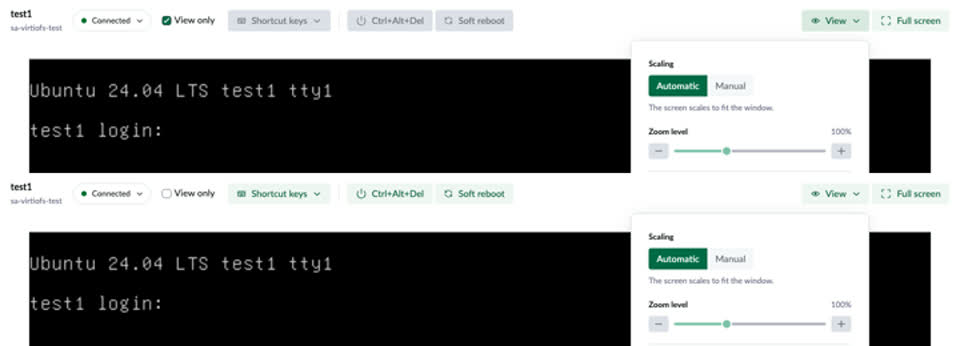
The View panel's Reset to defaults sets every setting back to its default, including View only, which now lives in the toolbar. So someone watching in View only who resets the zoom starts sending their mouse and keyboard to the VM. In my re-check, a click and a key after the reset went out as 3 pointer and 2 key events (dropped by the test).
Fix: reset only the panel's own settings (scaling, zoom, quality, compression) and keep View only. Pass B has a scratch unit test that fails on the head commit and passes with that change.
Top: View only on, input controls disabled. Bottom: after Reset to defaults, View only is off and the controls are back.
2
Anyone who used the current console keeps Manual zoom
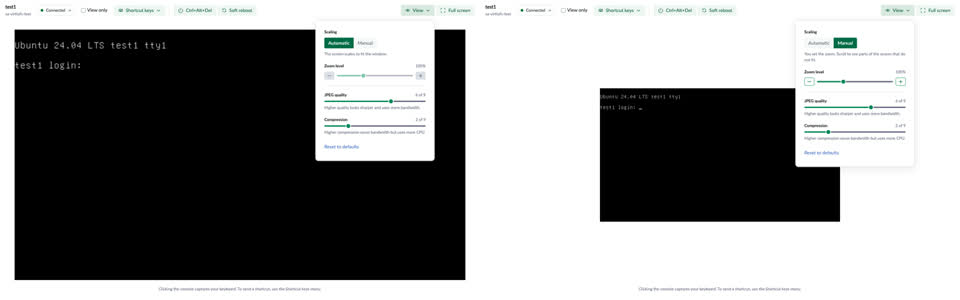
The redesign makes Automatic (fit to the window) the default, but main writes its own default, Manual at 100%, to the same localStorage key the first time the console opens, without the user choosing anything. The new default only reaches browsers that never opened the console. Everyone else gets the 720x400 screen in a big black area after the upgrade.
Fix: the simplest is a new storage key, so main's auto-saved defaults don't count as a choice. Someone who really picked Manual on main picks it once more.
Left: a browser that never opened the console gets Automatic. Right: a browser that opened it on main first stays on Manual 100%.
3
The JPEG quality and Compression sliders are 4px tall
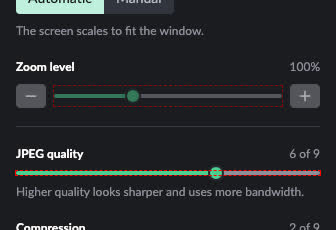
flex: 1 on every slider is meant for the zoom row, but in the column sections it sets the height, so those two inputs collapse to their 4px track. A click on the visible thumb, 6px off the line, doesn't move it; only a click on the line does. Zoom is fine (20px).
Fix: apply the flex: 1 only to the zoom row's slider.
Each slider's own box outlined in red: zoom is 20px tall, JPEG quality is the 4px line and the thumb hangs outside it.
4
From the keyboard, holding Ctrl or Alt makes the keys below unreachable
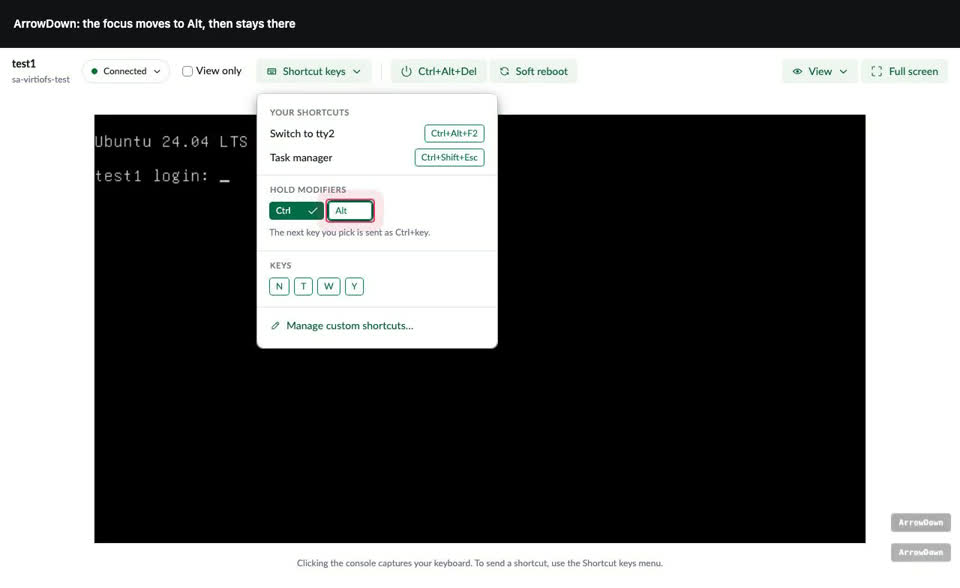
RcDropdown collects its items when the menu opens. Turning a modifier on swaps the keys below it (Print Screen and the F-keys become N, T, W, Y, or Del), and the new items aren't in its list, so ArrowDown stops at Alt. With a mouse it works. Main's old menu had no keyboard access at all, so it isn't a regression, but the new keyboard path breaks half way.
Fix: keep the same items while the menu is open, for example render every key and disable the ones that don't go with what is held. Pass B reasoned this from RcDropdown's code; not tried yet.
Keyboard only: Enter, ArrowDown to Ctrl, Space, then ArrowDown stays on Alt (Pass B, Chromium).
5
Adding or deleting a shortcut from the keyboard loses focus
While the save runs, the delete buttons and Add shortcut are disabled. The one just pressed has focus, and a focused button that gets disabled drops focus to the page, so the next Tab starts again from the top of the dialog (WCAG 2.4.3). On main, a keyboard delete keeps focus on a close button.
Fix: don't disable the buttons during the save; add and remove can return early while saving is set.
The dialog reports a failed save only with a growl, and the console page uses the blank layout, which has no growls. With the save failing, a delete leaves the row and a new shortcut doesn't appear, with no message. On main the Save button turned into "Error".
Fix: show the error in the dialog itself, for example a Banner above the list.
Save answered 403: both rows still there after Delete, and nothing on screen says why.
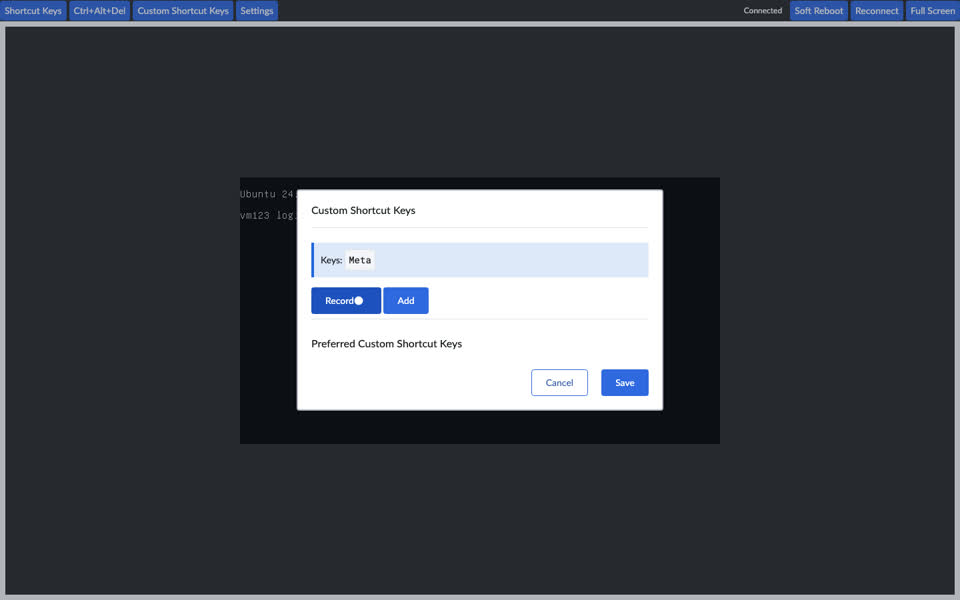
The recorder waits for another key after a modifier, so pressing only the Windows key records nothing. Main's recorder saved "Meta" on its own, which is the clean way to open the guest's Start menu, since the physical key goes to the host.
Fix: when a modifier is released with nothing else pressed, record it on its own.
Main's dialog records "Keys: Meta" and Add is enabled. On the PR, the same key leaves the field empty.
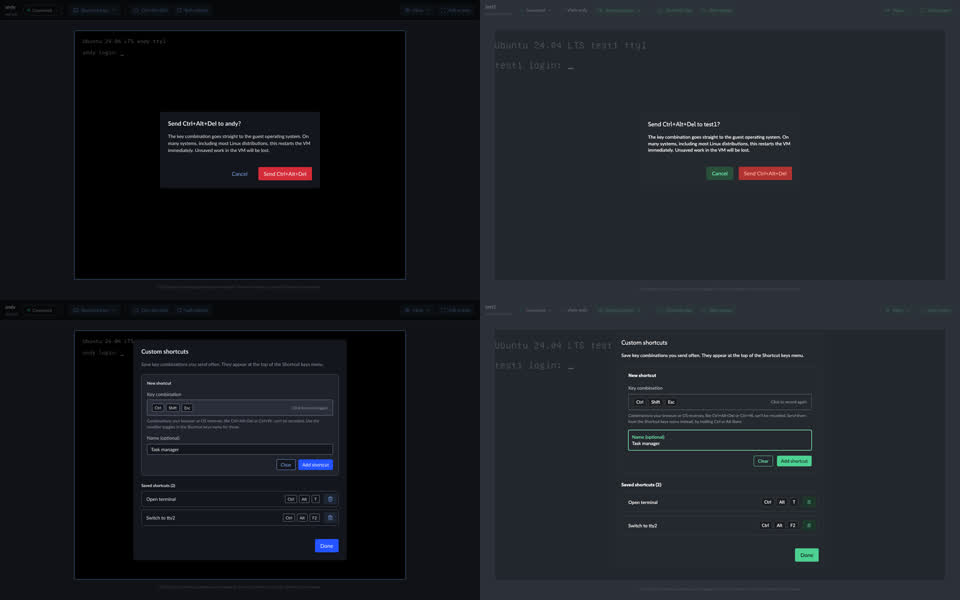
Ken's Figma draws Send Ctrl+Alt+Del red, so the PR overrides RcButton's primary with the error colors. On PR 1225 you asked for normal usage instead of a red Delete, and the shell's RcModal story uses a plain primary for its own Delete confirmation. One of the two has to give: Ken's red or normal usage.
The 3.42:1 contrast both passes measured in dark is not counted: it's the theme's own .bg-error pair, the same on every Delete in Rancher.
"The console disconnects while the VM restarts and reconnects when it is back." comes from Ken's frame. Reading KubeVirt, with rebootPolicy unset (true for every VM on both backends) the guest restarts inside the same QEMU, so the console should stay connected and show the restart. A real soft reboot is off limits on the shared VMs, so this is from the code only.
The override of _refreshCursor reads noVNC's private _cursorImage. rfb.showDotCursor = true is public and covers the same case, but draws a small dot instead of the arrow, which is a look decision. The private override can break on a noVNC upgrade. The two-pointer case on a desktop VM is still untested (no graphical VM on either backend), and it would apply to both.
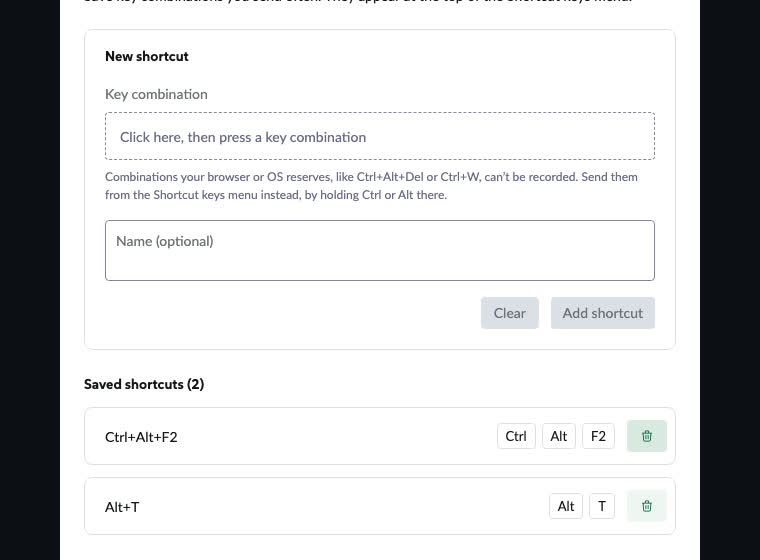
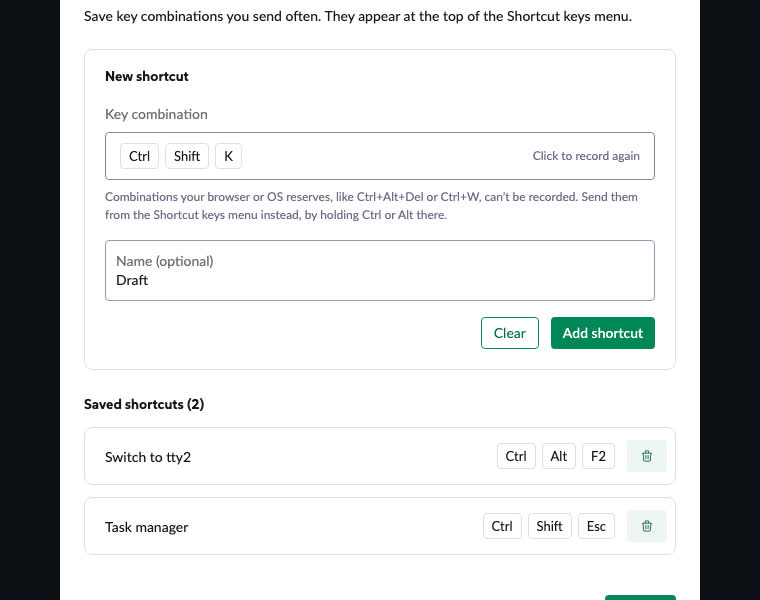
The dialog stays mounted, so a combination and name you recorded but didn't add come back the next time it opens, which reads like they might have been saved. Main rebuilt the dialog each time.
Recorded Ctrl+Shift+K, named it, clicked Done, reopened: the draft is still in the form.
The menu keeps its own key lists while the wrapper still maps the same keys to keysyms, with labels nothing reads now. A key added to one and not the other throws in sendKeys.
The wrapper is at 55% line coverage: finding a stopped VM by uid, the starting state, the grace period, the keys sendKeys passes on and the reset have no tests. A reset test would have caught finding 1.
The open docs PR for issue 12015 explains the current toolbar with screenshots, and QA's manual test still says to click Shortcut Keys, then Ctrl, Alt, Del. Both need an update when this lands. Not something to change in the PR.
–
Dropped after checking
Dropped
Red text in dark, 2.38:1 (Reconnect) and 3.42:1 (confirm button). Both passes measured them. They are the theme's own --error / --error-text: the shell's .text-error and .bg-error give the same numbers in this build, so it isn't this PR's.
Full screen bar at 3.8:1 at rest. Cody's probe flagged it; the rendered pixels give 5.32:1 (it ignored the bar's 0.7 opacity over the black screen), and Pass B measured it passing too.
Shared components: the Checkbox's 14px box, ButtonGroup's hover at 4.41:1, RcDropdownTrigger without aria-controls. Same anywhere in Rancher.
Pass B's optional N7 and N9 (Options API instead of Composition API; "Del" and "Space" not translated): left out.
Pass A: Cody's process
Followed my-pr-full-review in this session, mapped to our setup: the PR preview for his dev server, harvester-main for his master build, local files instead of his harness, our recorder, his a11y-probe.mjs run from the clone against a local Chromium with the same write and key stubs (axe beside it, since the probe looks for it under /workspace). Base review, then his seven passes, then verify, refine, final pass, remove suggestions, condense, and the master check last. Every key, soft reboot and preference write was held in the browser.
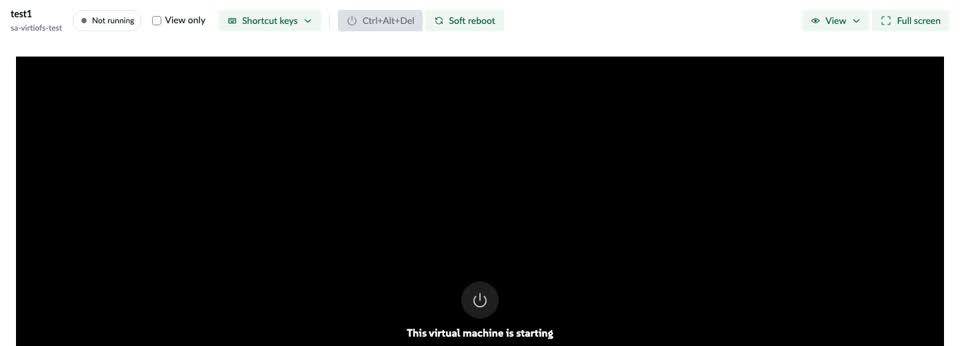
Before this change: main (vm123 on .105).With this change: the PR (test1 on .118). Full screen is left out of both: the recorder can't encode a window resize.
Acceptance, from issue 10420 (as far as the PR claims it) and the PR description
Criterion
Verdict
AC1
Connects and says so
Met
AC2
Every old key combination can be sent (decoded on the socket)
In use shown, Take over offered, the other session kept
Met
AC5
Ctrl+Alt+Del and Soft reboot ask first, also in full screen
Met
AC6
Scaling, zoom, quality, compression remembered
Met
AC7
Full screen fills the window, dialogs on top
Met
AC8
Connecting, in use, connection lost, not running cards
Met
AC9
Matches the new design
Met, deviations were your decisions
AC10
Light and dark
Met
Not in this PR: several viewers at once, copy and paste, speed, replacing the tool, the HEP. Open on the issue: Prime-only gating and HEP scope, both unanswered.
Design pass, Figma against the PR in dark
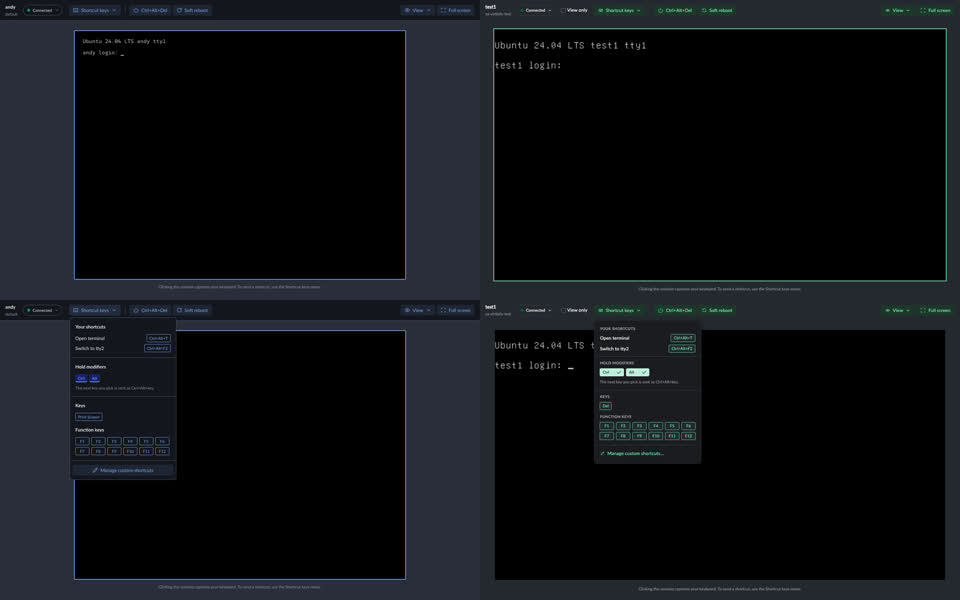
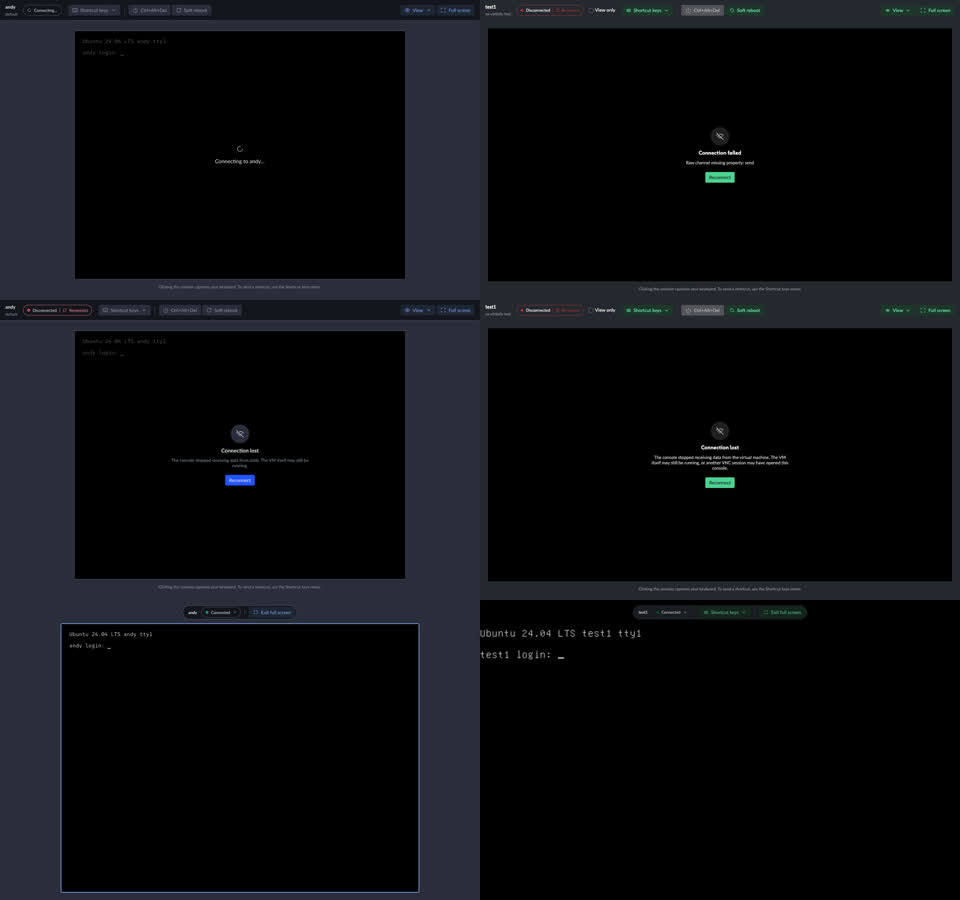
Connected and Shortcut keys menu: Figma on the left, PR on the right.Confirm and custom shortcuts dialogs.Connecting (my staging broke noVNC here; the real connecting card checked fine), connection lost, full screen.
Measured within 1-2px: toolbar, pill, buttons, menu, confirm (480px), dialog (640px), full screen bar. The differences are your decisions (View only checkbox, Shortcut keys and edge to edge in full screen, Del under Ctrl+Alt, two reworded texts) or come from shell components (uppercase group labels, checkmarks, RcModal title weight).
Pass B: our process
A fresh agent that never saw Pass A, following prompts/code-review.prompt.md and your review rules (PR-introduced only, simple fix, normal usage, review shape). It checked the PR against main on both previews with 20 Playwright scenarios, read the Rc components it relies on, ran a coverage report and wrote a scratch unit test that fails on the head commit for finding 1. Its preference snapshot of .118 was identical before and after.
Pass B: after Ctrl is turned on from the keyboard, focus stays on Alt.
Not checked by either pass
A real Ctrl+Alt+Del, soft reboot, Take over or preference save: all held in the browser.
A desktop VM drawing its own pointer: none running on .118 or .105.
The console inside a Rancher 2.15 or 2.16 host: only standalone Harvester.
A screen reader (roles and names checked in the DOM, axe and the probe only), and keyboard lock in full screen.